chorme插件开发(一)

概览

谷歌浏览器插件是一种小型的用于定制浏览器体验的程序。每个插件必须在根目录包含 manifest.json 来描述插件,其文件结构如下

1
2
3
| 插件根目录
|--- manifest.json // 插件描述文件
|--- 其它文件(图标、js 、css 等)

manifest.json

用来描述插件信息,声明插件需要的权限及相关功能的路径

1
2
3
4
5
6
7
8
9
10
11
12
13
14
15
16
17
18
19
20
21
22
23
24
25
26
27
28
29
30
31
32
33
34
35
36
37
38
39
40
41
42
43
44
45
46
47
48
49
50
51
52
53
54
55
56
57
58
59
60
61
62
63
64
65
66
67
68
69
70
71
72
73
74
75
76
77
78
79
{
// 必须
"manifest_version": 3, // 插件版本,建议使用最新版本 v3
"name": "My Extension", // 插件名称
"version": "versionString", // 插件版本

// Recommended
"action": {...},
"default_locale": "en", // 默认语言
"description": "A plain text description", // 插件描述
"icons": {...}, // 插件图标

// Optional
"author": ..., // 作者
"automation": ..., //
"background": {
// Required
"service_worker": "background.js", // background js
// Optional
"type": ...
},
// "chrome_settings_overrides": {...}, // 已不再支持
// "chrome_url_overrides": {...}, // 已不再支持
"commands": {...}, // 插件自定义右键菜单
"content_capabilities": ...,
"content_scripts": [{...}], // web 页面上下文中执行的 js ,可通过其实现页面与插件其它 js 的通信
"content_security_policy": {...}, // 安全策略
// "converted_from_user_script": ...,
// "cross_origin_embedder_policy": {"value": "require-corp"},
// "cross_origin_opener_policy": {"value": "same-origin"},
// "current_locale": ...,
// "declarative_net_request": ...,
"devtools_page": "devtools.html", // 自定义的开发者工具页面
// "differential_fingerprint": ...,
// "event_rules": [{...}],
// "externally_connectable": {
// "matches": ["*://*.example.com/*"]
// },
// "file_browser_handlers": [...],
// "file_system_provider_capabilities": {
// "configurable": true,
// "multiple_mounts": true,
// "source": "network"
// },
"homepage_url": "https://path/to/homepage", // 插件首页
// "host_permissions": [...],
// "import": [{"id": "aaaaaaaaaaaaaaaaaaaaaaaaaaaaaaaa"}],
// "incognito": "spanning, split, or not_allowed",
// "input_components": ...,
// "key": "publicKey",
// "minimum_chrome_version": "versionString",
// "nacl_modules": [...],
// "natively_connectable": ...,
// "oauth2": ...,
// "offline_enabled": true,
// "omnibox": {
// "keyword": "aString"
// },
"optional_permissions": ["tabs"], // 可选的权限
"options_page": "options.html", // option 页面
"options_ui": {
"chrome_style": true,
"page": "options.html"
},
"permissions": ["tabs"], // 插件需要的权限,需要在这里声明之后才能使用相关权限
// "platforms": ...,
// "replacement_web_app": ...,
// "requirements": {...},
// "sandbox": [...],
// "short_name": "Short Name",
// "storage": {
// "managed_schema": "schema.json"
// },
// "system_indicator": ...,
// "tts_engine": {...},
// "update_url": "https://path/to/updateInfo.xml",
// "version_name": "aString",
// "web_accessible_resources": [...]
}
content_scripts

Chrome 插件中向页面注入脚本的一种形式(虽然名为 script,其实还可以包括 css 的),借助 content-scripts 我们可以实现通过配置的方式轻松向指定页面注入 JSCSS

background

一个常驻的页面,它的生命周期是插件中所有类型页面中最长的,它随着浏览器的打开而打开,随着浏览器的关闭而关闭,所以通常把需要一直运行的、启动就运行的、全局的代码放在 background 里面。

点击 browser_action 或者 page_action 图标时打开的一个小窗口网页,焦点离开网页就立即关闭,一般用来做一些临时性的交互。

homepage_url

开发者或者插件主页设置

开发

  1. 创建好插件文件夹,添加 manifest.json,输入如下内容
1
2
3
4
5
{
"manifest_version": 3,
"name": "插件测试",
"version": "0.0.1"
}
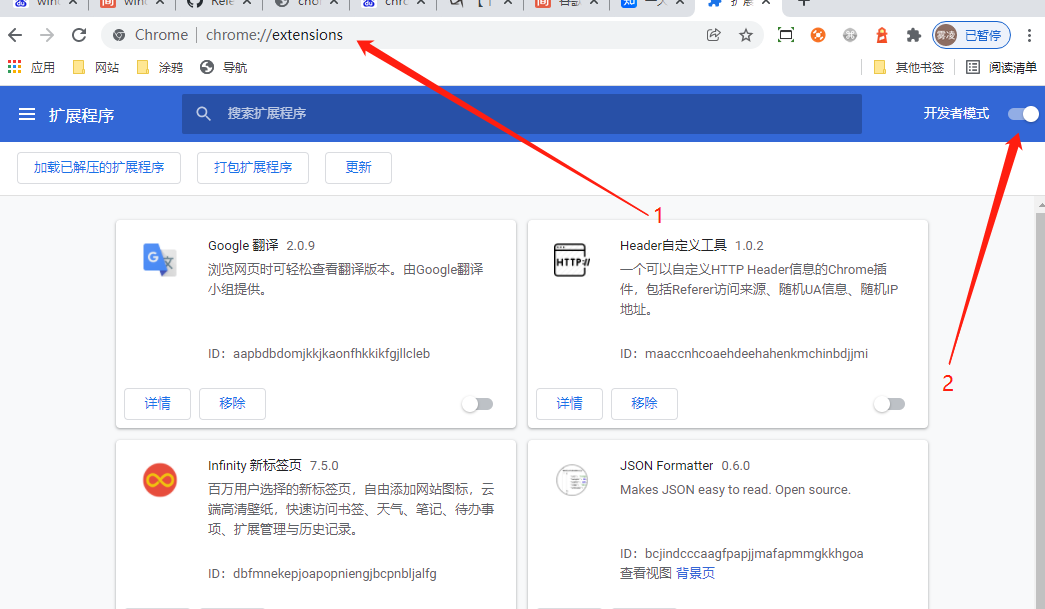
  1. 在浏览器中访问 chrome://extensions,打开开发者模式。
    charles 代理转发
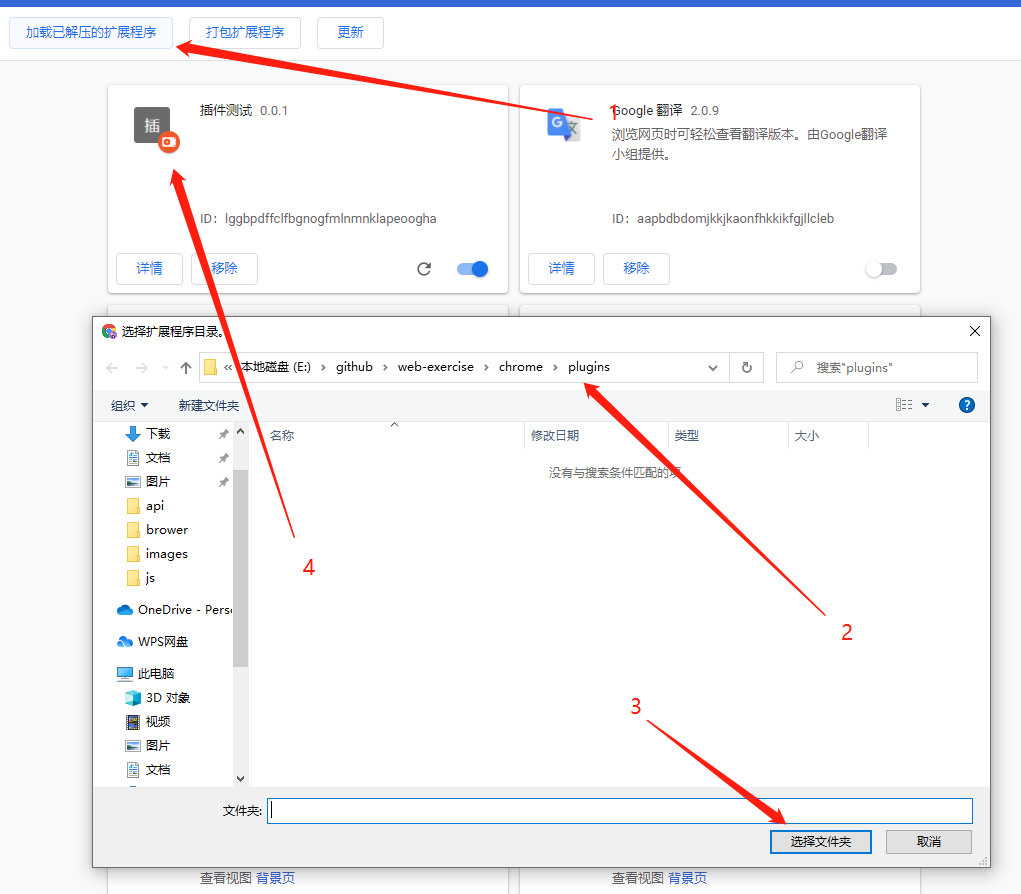
  2. 加载解压的插件
    charles 代理转发

参考